Published 03 Jun 2026
Add Your Location to Your Osdire Profile to Improve Visibility
Osdire has introduced a profile update that helps buyers find freelancers by location. Freelancers can now add their city and country to their profile, making it easier to appear in relevant location-based searches.

Post content
This update is designed to improve freelancer discoverability and help buyers connect with talent in specific regions, countries, and cities.

Why location matters for freelancers on Osdire
Many buyers search for freelancers based on location. Some clients prefer working with professionals in a specific country, time zone, region, or market. Others may need local knowledge, language familiarity, regional experience, or easier communication during working hours.
By adding your city and country to your Osdire profile, you give buyers another way to find you when your location is relevant to their project.
This small profile update can help improve your visibility across searches where location matters.
This small profile update can help improve your visibility across searches where location matters.
What freelancers should update
Freelancers should add both their city and country to their Osdire profile.
This helps make your profile clearer and more complete for buyers who are comparing freelancers. A complete profile can also make it easier for clients to understand where you are based before they contact you or place an order.
For example, if a buyer is looking for a freelancer in a specific country or region, your updated location can help your profile appear in more relevant discovery opportunities.
How to add your city and country on Osdire
Updating your location only takes a minute. Follow these steps to add your city and country to your Osdire profile.
Step 1: Open your account menu
Click your profile image at the top right of your Osdire account, then select Settings.

Step 2: Go to Preferences
Inside Settings, click Preferences to open your profile preference options.

Step 3: Add your city and country
Update your location by adding your city and country in the location fields and click save.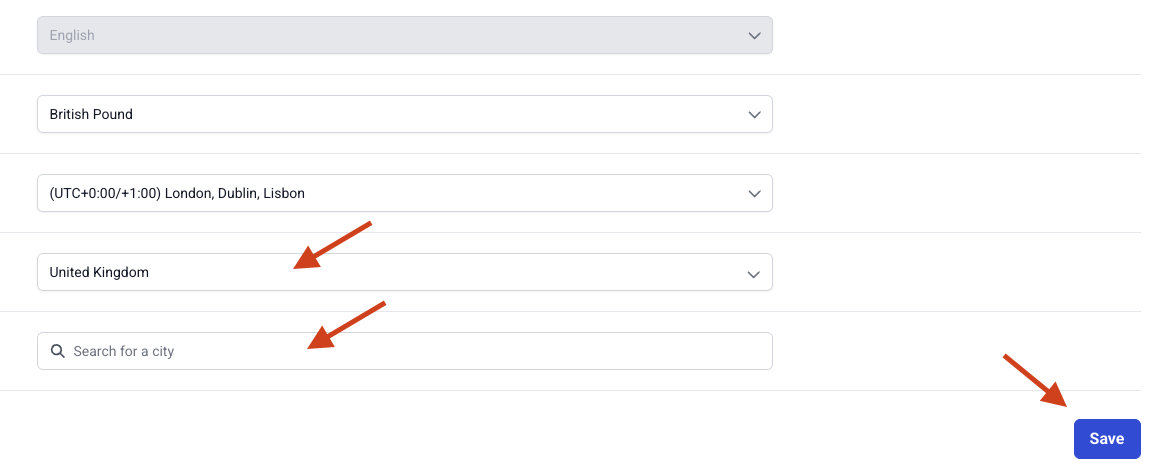 image.png 34.72 KB
Once saved, your updated location will be added to your freelancer profile and can help buyers find you in more relevant location-based searches.
How does this help buyers find the right freelancers?
Location-based discovery helps buyers narrow their search when geography is part of the decision. This can be useful for projects where time zone alignment, local market knowledge, language, or regional experience matters.
For freelancers, it creates another opportunity to be found by buyers who are already looking for talent in a relevant location.
Adding your location does not replace the importance of strong services, clear pricing, good descriptions, and a complete profile. It simply adds another useful signal that can help buyers understand whether you are a good fit.
A small update that can make your profile easier to find
Keeping your Osdire profile accurate and complete is one of the simplest ways to improve how buyers understand your services. Your location is now part of that profile quality.
If you have not added your city and country yet, update your profile today so buyers can find you in more relevant location-based searches.
It only takes a minute, and it can help your profile appear to the right clients at the right time.
Quick Summary
Osdire freelancers can now add their city and country to their profile. This helps buyers discover freelancers in relevant locations and gives freelancers a simple way to improve profile visibility. To update your location, go to your profile, click the edit icon next to your name, add your city and country, and save the changes.